OVERVIEW
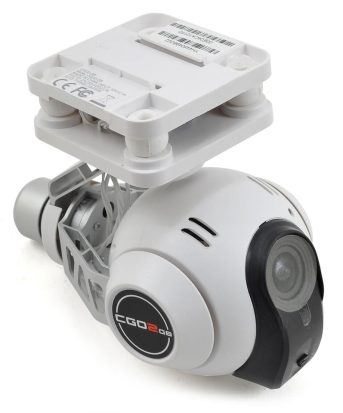
The CGO2 GB combines a 16 megapixel, 1080p/60fps camera and a 3-axis brushless gimbal into a single unit that captures smooth, steady aerial video and still images in brilliant detail. It’s controlled via a 5.8GHz Wi-Fi link that lets you snap pics, start and stop video and see live streaming video using a compatible iOS or Android mobile device. All you need is the free CGO2 app, available at Google Play and iTunes app stores.
SPECIFICATION
| Weight: |
163g (5.75 oz) |
| Sensor Resolution: |
16 megapixels |
| Recorded Video Resolutions: |
1080p/60fps or 1080p/48 (adjustable via app) |
| Live Video Resolution: |
QVGA 330x240/30fps |
| Field of View: |
155° |
| Gimbal Pitch Range: |
-90° to +45° |
| Gimbal Roll Range: |
±45° |
| Media Storage: |
8GB Micro SD card (included) |
FEATURES
- Wi-Fi Password: 1234567890
- Camera and 3-axis brushless gimbal in one
- Captures 1080p/60fps video
- Snaps 16 megapixel stills
- 5.8GHz Wi-Fi link controls camera and streams live video
- Compatible with all Blade® 350 QX-series quadcopters
- Installs in minutes
- Requires iOS or Android device with 802.11N Wi-Fi compatibility
- May require tall landing gear set (BLH7815TGA, sold separately)
Changes to the previous Version:
- better picture
- now functional with all Android devices
To get the CGO 2 updated, please follow these steps:
1. Get this file onto an empty micro SD-card
2. Insert the micro SD-card into the CGO 2
3. Power up the 350QX
4. The front LED of the CGO 2 will stop flashing if the update has been completed
5. Switch off the 350QX, remove the micro SD-card and delete or better format it.